Learning how to build a robust digital world can feel overwhelming. The sheer number of systems working together is immense. Where do you even begin to understand how it all fits together?
This guide introduces a powerful learning method. We use small, focused exercises to explore large ideas. These mini projects provide a safe space for experimentation.
You will tackle one concept at a time. This approach builds your skills step-by-step. It connects book knowledge with real-world application. You gain confidence without the stress of a full-scale production.
We will cover essential organizational strategies. You will learn about effective code structure and modular design. Each exercise demonstrates a specific architectural principle. This creates a clear and practical learning path for developers at any level.
Key Takeaways
- Small-scale exercises are effective tools for mastering complex software design.
- Hands-on practice bridges the gap between theory and real-world application.
- Focused projects allow you to learn one architectural concept at a time.
- This method builds competency progressively, from basic to advanced patterns.
- You can experiment and learn best practices in a manageable, low-risk environment.
Introduction: The Importance of Unity Game Architecture
The backbone of any successful digital creation lies in its underlying organizational framework. This structural planning determines how components interact and scale over time. Proper organization from the start prevents costly revisions later.
Understanding the Role of Architecture in Game Development
Well-designed software organization provides crucial advantages. It enables scalability, allowing new features without disrupting existing systems. This flexibility supports growth and adaptation.
Maintainability is another key benefit. Clean, organized code is easier to understand and modify. This becomes vital when frequent changes occur during creation.
Performance optimization stems from efficient resource management. Good structure ensures smooth operation. It also accelerates the development process by reducing duplication.
Benefits of Mini Projects for Learning Complex Systems
Small-scale exercises offer an effective learning approach. They let you focus on one concept at a time. This builds confidence through manageable challenges.
These focused activities demonstrate architectural principles clearly. You can experiment with different organizational strategies. This hands-on method bridges theory and practical application.
The controlled environment reduces risk while building essential skills. You gain experience with complex systems gradually. This progressive learning path develops strong foundational knowledge.
Foundations of Unity Game Architecture
Unlike traditional programming, this platform utilizes a modular system where behavior is added piece by piece. This component-oriented approach requires adapting common design patterns. The core idea involves three fundamental organizational concepts.
Core Components and Systems
First, you define a data model. This establishes the basic information for your creation. You then link this data to the objects in your scene.
Next, controllers manage the interaction between different parts. They handle things like movement or processing user input. This separates the control logic from the data itself.
Finally, the built-in component system displays the results. You divide object behavior into individual component scripts. These scripts are then attached to objects as needed.
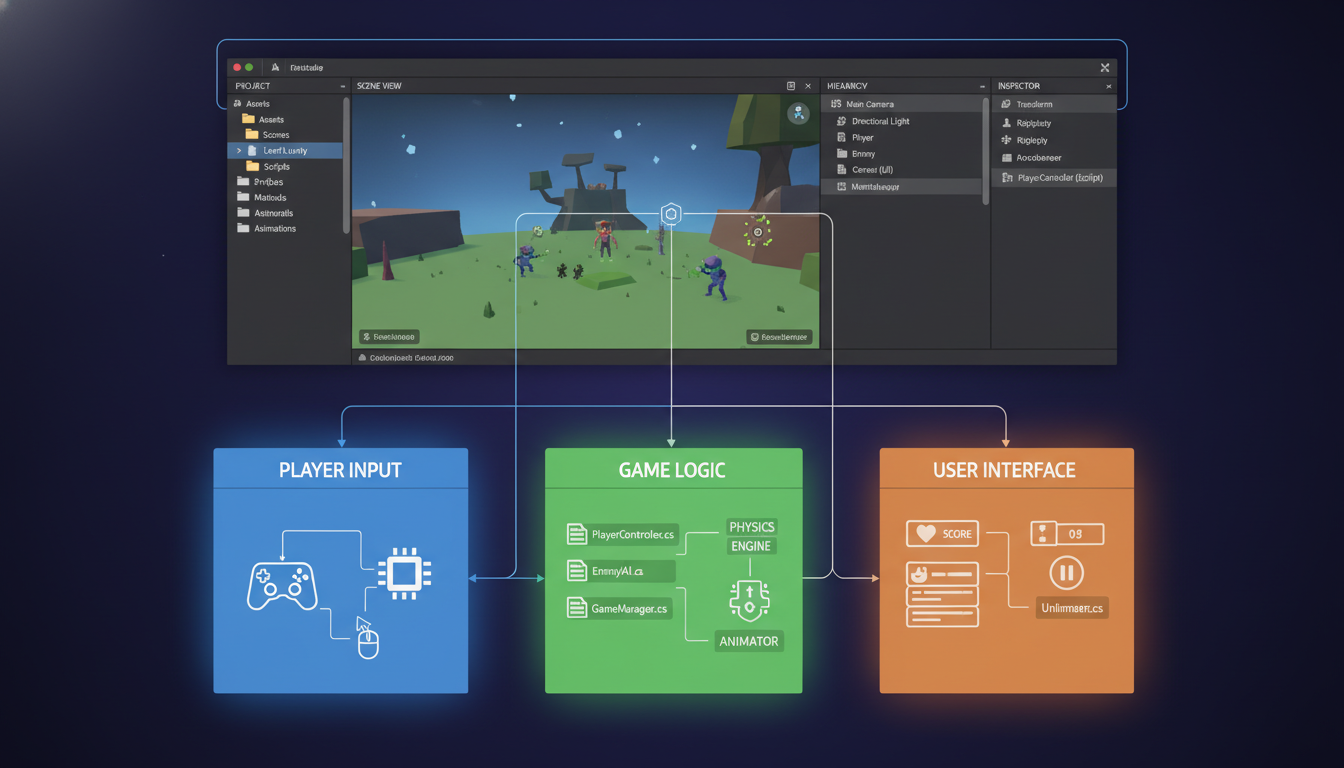
Overview of Game Logic, Physics, and Presentation Layers
The architecture naturally separates key responsibilities. This clear division maintains organization and clarity. Each layer has a distinct purpose.
| Layer | Responsibility | Example Components |
|---|---|---|
| Game Logic | Handles rules, state, and user input. | GameManager, PlayerController |
| Physics | Manages collisions, gravity, and movement. | Rigidbody, Collider |
| Presentation | Controls visual and audio output. | Renderer, AudioSource, Animator |
Understanding this data flow is crucial. It moves from initialization through updates to final rendering. This knowledge forms the base for more advanced patterns.
Exploring unity mini projects for understanding game architecture
Building a solid foundation requires understanding the essential ‘plumbing’ of an application. This approach prioritizes infrastructure over complex mechanics.
Defining the Concept: Mini Projects as Learning Tools
These focused exercises act as strategic learning tools. They use simple concepts to teach vital organizational principles.
The PaddleBallSO demo serves as a perfect example. It recreates a classic two-player game with paddles and a ball. The emphasis is entirely on the behind-the-scenes systems.
This way of working allows you to concentrate on data flow and system communication. You learn how different parts connect without distraction.
| Project Focus | Learning Outcome | Key System |
|---|---|---|
| Data Management | Handling player information and game state | ScriptableObjects |
| Input Handling | Processing user commands effectively | Input System |
| UI Integration | Connecting interface elements to game logic | UI Toolkit |
This controlled environment is ideal for testing ideas. You can implement and adjust systems with clear results. It saves time and reduces frustration compared to large-scale work.
This practical approach builds competency incrementally. Each small success clarifies a specific architectural concept.
Organizing Code with Design Patterns
Clean code maintenance requires systematic approaches that isolate distinct application layers. These structural blueprints help manage complexity as your creation grows.
Applying MVC, MVP, and MVVM in Game Development
The MVC pattern separates data, presentation, and control into three distinct classes. The Model stores pure data without logic. The View handles visual presentation. The Controller processes user input and manages data flow.
MVP modifies this approach by shifting input handling to the View. The Presenter extracts data from the Model and formats it for display. This method works well for user interface development.
MVVM represents an evolution where the ViewModel acts as an intermediary layer. Views subscribe to property change notifications. This enables reactive programming approaches.
Key differences between these design approaches include:
- MVC: Controller handles input, ideal for game logic
- MVP: View manages input, excellent for UI interface development
- MVVM: Data binding through ViewModel, supports reactive patterns
Each pattern offers distinct advantages for specific scenarios. Choosing the right organizational method depends on your project’s requirements and scale.
Utilizing ScriptableObjects for Modular Design
ScriptableObjects represent a paradigm shift in how developers handle shared configuration. They provide a powerful way to manage reusable data across multiple objects.
Advantages of ScriptableObjects in Unity
Choosing the right tool depends on your needs. Use a Prefab for single instance creation. Modify Prefab settings for variations. ScriptableObjects excel when you need consistent data across multiple objects.
The PaddleData example demonstrates this beautifully. Shared properties like movement speed live in the ScriptableObject. Instance-specific settings like input axis names remain separate. This separation creates clearer intent in your design.
Best Practices and Real-World Examples
Keep your data modular and organized. Use separate ScriptableObjects for different object types. Proper folder structures help manage the growing number of asset files.
Avoid excessive use. Deploy ScriptableObjects only when they provide clear benefit. Remember that changes happen “live” at runtime. Use version control to track modifications.
Real-world implementations include GameDataSO for central configuration. ScriptableObject-based event channels enable decoupled communication. LevelLayoutSO allows easy level modification. These approaches result in maintainable architectures.
Building Modular and Scalable Unity Projects
Creating scalable digital experiences requires thoughtful structural planning from the ground up. Modular design principles enable developers to construct applications from independent, reusable components. This approach ensures your project remains manageable as complexity grows.
Integrating Prefabs and Scene Management
Prefabs serve as the fundamental building blocks for modular development. Construct your scenes primarily from these reusable assets with minimal instance overrides. This method allows isolated testing of individual features while maintaining consistency across your application.
Effective scene management utilizes additive loading instead of single-scene transitions. LoadSceneMode.Additive provides flexible control over object lifetimes during scene changes. Explicit unloading gives precise management of memory resources.
Separate long-living objects into dedicated scenes rather than using DontDestroyOnLoad. This maintains better control over object lifetimes. The demo project implements this through Scene Bootstrapper and Sequence Manager components.
ScriptableObjects provide superior data storage compared to MonoBehaviours for static gameplay information. Event-based communication reduces dependencies between components. These strategies create a clean separation between data, logic, and presentation layers.
Practical Code Examples and Mini Projects
A classic two-player activity provides an excellent case study for architectural principles. The initial approach followed straightforward rules where each element became a separate prefab with its own script component.
Pong-Style Game Demonstrations
The ball implementation revealed common structural challenges. Designers set the initial speed using the same variable that tracked movement during play. This approach lost the original value once motion began.
Collision detection and object removal were buried deep within trigger callbacks. The component handled both physical behavior and self-destruction logic. This tight coupling made the system difficult to modify or test.
Bridging Input, Physics, and Custom Code
Refactoring separated responsibilities into distinct containers. Game rules, user interaction, and visual presentation moved to appropriate classes. ScriptableObjects exposed parameters while regular C# classes handled pure logic.
The improved ball class used interfaces to share specific capabilities without full object access. A delegate system managed object lifecycle requests instead of direct destruction calls. This created cleaner communication between components.
Moving functionality to standard C# classes offered better language features for creating small, testable units. The trade-off was losing Inspector visibility, but gained shareability with other .NET applications.
Testing, Debugging, and Optimization Strategies
Maintaining quality as your digital creation grows requires systematic validation processes. When teams expand beyond ten members, manual testing becomes impractical. Automated testing ensures consistent results across all changes.
Implementing Automated Testing and Debug Tools
Start by writing unit tests for code moved from MonoBehaviours to regular classes. This method works well with standard testing frameworks. Content creators benefit from validation tools too.
Create editor buttons that quickly check Prefabs and data inputs. This saves significant time during development. Set up Unity Test Runner for automatic retesting.
Advanced teams use AI-driven playtesting. Multiple game clients run simultaneously to find crashes. Each automated discovery frees human testers to focus on gameplay quality.
Optimizing Scene Transitions and Resource Management
Implement clean shutdown procedures for your application. Release all resources before quitting. Avoid persistent global variables and DontDestroyOnLoad objects.
Establish a specific shutdown order. This makes errors and resource leaks easier to spot. The result is a cleaner editor state when exiting Play mode.
Proper shutdown prevents weird behaviors in editor scripting. It also ensures smooth scene transitions without performance degradation. This systematic approach maintains system stability across version updates.
Conclusion
Effective development workflows emerge from thoughtful adaptation rather than strict pattern implementation. Design approaches are conceptual tools, each with distinct advantages and limitations.
The optimal organizational method always serves your specific project context. Consider team collaboration needs and technical requirements when selecting architectural patterns.
Small-scale exercises provide safe environments for experimenting with complex systems. They build confidence through manageable challenges while demonstrating core principles.
Focus on practical outcomes rather than theoretical perfection. Apply learned techniques incrementally to address real pain points in your current workflow.
This pragmatic approach leads to more maintainable, scalable software solutions that grow with your team’s expertise.
FAQ
What is the main benefit of using mini projects to learn game architecture?
How do design patterns like MVC improve a project’s organization?
Why are ScriptableObjects important for modular design?
How can prefabs and scene management contribute to a scalable project?
What role do events play in a well-architected game?
What are some key optimization strategies for these projects?

Game developer with over 10 years of professional experience specializing in the mobile sector. George’s journey began with a passion for indie development, leading him to contribute to several successful mobile titles, including the critically acclaimed puzzle-platformer ChronoShift and the top-down strategy game Pocket Empires.