Welcome to your complete guide for building an exciting platformer game from the ground up. We will use a powerful development environment to bring your ideas to life. This journey will show you how a Unity platformer kit can speed up your work.
Are you new to making games? Or maybe you have some experience but want to work faster? This guide is for you. We will cover every important step to create a professional-quality game that players will enjoy.
You will learn to use pre-built assets and change gameplay mechanics. We will add smooth character controls and design fun levels. Your personal creative touch will make the game unique.
This tutorial explores both 2D and 3D development styles. You can pick the approach that fits your vision and skill level best.
By the end, you will have the knowledge to build a fully working game. You will be ready to share it or keep developing it into your dream project.
Key Takeaways
- This guide provides a full path from concept to a playable game.
- It is designed for both beginners and experienced developers.
- You will learn to customize gameplay and create engaging levels.
- The tutorial covers both 2D and 3D development approaches.
- You will gain the confidence to build and share your own project.
- Using pre-built assets can help streamline the development process.
Introduction to Platformer Development in Unity
Jumping into game creation can seem daunting, but building a classic adventure game is an excellent starting point. This genre has thrilled players for years with timeless titles. Now, you can craft your own unique experience.
The development environment is a perfect fit for this project. It supports both 2D and 3D styles. You get an intuitive interface and powerful tools. This balance makes it great for beginners and experts alike.
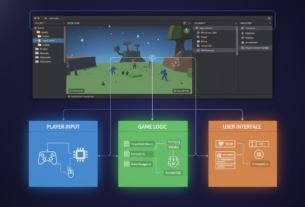
You will start with core concepts like physics and player input. These elements form the foundation of any great game. Understanding them is your first step to success.
Mastering mechanics like jump height and movement speed is key. This knowledge helps you create content that feels responsive and fun. Good design keeps players engaged and coming back for more.
The component-based system lets you build your world step-by-step. You can test each piece as you go. This method prevents feeling overwhelmed and ensures a smooth workflow.
Essential Components of a Unity platformer kit
Modern game creation relies on well-organized collections of essential elements that work together seamlessly. These packages provide everything needed to build engaging interactive experiences efficiently.
Character controllers form the foundation of any great game. They handle movement, jumping, and physics interactions automatically. This saves you from writing complex code from scratch.
Level design tools let you build diverse environments quickly. You can create everything from simple tutorial areas to complex challenge stages. Pre-made platform elements help you prototype effectively.
Visual polish comes from animation systems and character models. These ensure player actions have corresponding visual feedback. The result is dynamic, engaging gameplay that feels responsive.
User interface elements create a professional experience. Health bars, score displays, and menus provide crucial information. They help players understand their progress and game state.
Sound libraries establish atmosphere and provide audio feedback. Music tracks and effects significantly enhance player immersion. Good audio makes actions feel more impactful.
Documentation and example scenes demonstrate best practices. You can study and modify these reference implementations. This helps you learn while developing your unique mechanics.
Customization options let you adjust movement parameters and visual styles. Your final project will reflect your creative vision rather than feeling like a generic template.
Setting Up Your Unity Environment and Assets
The initial setup phase might seem routine, but it’s a critical step that prevents future complications. Begin by downloading the Unity Hub, which serves as your central management tool. This application helps you organize different versions and projects efficiently.
Choosing the right version is important for stability. Opt for a Long Term Support release that provides extended compatibility. This ensures your project remains functional throughout development.
Creating a new project involves selecting the appropriate template for your vision. Organize your folder structure logically from the start. Separate assets, scripts, and scenes for easy access.
Importing your game assets is straightforward through drag-and-drop or the Package Manager. The engine automatically processes and prepares the content for immediate use. Proper organization establishes good development habits.
Configure project settings including physics layers and input mappings. These adjustments ensure smooth performance across different devices. Quality settings help optimize the visual experience.
Finally, test your setup with a simple scene containing basic elements. This verification step confirms everything works correctly before advancing to complex tasks.
Exploring the Unity Asset Store and Community Support
Having access to a vibrant marketplace of pre-built components significantly accelerates the creative process. The digital storefront features an impressive collection of over 11,000 highly-rated resources that have earned top marks from thousands of satisfied users.
When searching for game development tools, you’ll find complete packages alongside specialized components. These include advanced character controllers, level design aids, and visual effect packages. Reading user reviews helps you select the perfect fit for your project’s needs.
The community forum connects you with experienced developers worldwide. This network provides invaluable assistance when troubleshooting challenges or seeking advice. You can share progress and learn from others who have completed similar projects.
Many creators offer demo versions and detailed documentation for evaluation. This lets you test compatibility before committing to purchases. Free resources are also available for prototyping and learning.
Every item undergoes strict quality checks before publication. This ensures professional standards and protects your project from problematic content. You can shop with confidence knowing each resource meets rigorous benchmarks.
Understanding Unity Render Pipelines
Choosing the right visual rendering system is a crucial decision that affects your entire project’s look and performance. Each pipeline offers different capabilities for targeting specific visual quality and performance goals.
Built-in Render Pipeline Overview
The Built-in Render Pipeline serves as the default solution. It provides a straightforward approach that works well for many projects.
This option has limited customization but remains perfectly functional for creating attractive games. It’s ideal when focusing on gameplay rather than advanced graphics.
Universal and High Definition Render Pipelines Explained
The Universal Render Pipeline (URP) offers quick customization and optimized graphics across platforms. Its flexibility in targeting functional optimization means consistent visual quality on different devices.
The High Definition Render Pipeline (HDRP) creates cutting-edge graphics for high-end platforms. Consider these technical cookies of decision-making when selecting your approach.
Most quality assets work with all three pipelines across recent versions. Your choice won’t limit access to community resources.
Integrating Characters and Controllers in Your Platformer
Bringing your game world to life starts with the characters that players will control and connect with. This stage transforms your project from static environments into interactive experiences.
The movement system forms the core of player interaction. Quality pre-built solutions save significant development time while ensuring professional results.
Implementing Cartoon Character Animations
Animated characters create memorable gaming moments. Cartoon styles work exceptionally well for broad audience appeal.
You’ll work with sprite sequences or 3D model rigs depending on your visual approach. Both methods require careful timing and smooth transitions between actions.
The animation controller manages states like idle, running, and jumping. Proper setup makes movements feel natural and responsive to player input.
Comparing 2D and 3D Controller Approaches
Two-dimensional movement focuses on left-right navigation with jumping mechanics. This approach uses simpler physics calculations.
Three-dimensional controllers introduce depth perception and camera management. They require more complex animation blending systems.
Many development packages include both controller types. The Single Entity license is entityrecommended for individual creators starting their journey.
Testing movement across different scenarios ensures consistent player experience. Adjust parameters like jump height until controls feel just right.
Advanced Techniques for Level Design and Scripting
Elevating your game design requires mastering advanced techniques that transform basic levels into memorable experiences. These methods help create stages that feel challenging yet fair to players.
Understanding player psychology is crucial for effective design. You want to guide players naturally through your intended experience without frustrating them.
Creating Smooth Platforming Gameplay
Refined movement mechanics make games feel responsive and enjoyable. Techniques like coyote time allow brief jumping after leaving platforms.
Jump buffering registers inputs slightly before landing. These features accommodate human reaction times for better control feel.
Careful physics tuning ensures predictable jumps and forgiving landings. Consistent responsiveness keeps players engaged throughout challenging sections.
Scripting and Customization Tips
Customizing your unity project through C# code adds unique mechanics. Object-oriented principles help create clean, maintainable modifications.
Visual scripting tools offer alternatives for developers less comfortable with traditional coding. They make advanced mechanics accessible to broader creators.
Playtesting reveals design issues you might miss through familiarity. Iteration is key to refining levels until they feel just right.
Gradual mechanic introduction through environmental storytelling helps players learn naturally. Safe spaces let them experiment with new abilities confidently.
Optimizing Performance with Effective Asset Management
Performance optimization separates amateur projects from professional releases. Smart management of your resources ensures smooth gameplay across all devices. This approach prevents frustrating frame rate drops and long loading times.
File sizes can vary dramatically in development. You might work with compact 390.9 KB packages or comprehensive 318.3 MB collections. Understanding what contributes to size helps you make informed decisions about essential resources.
Texture atlasing combines multiple small textures into larger sheets. This technique reduces draw calls and improves rendering performance. It’s particularly valuable for games displaying dozens of sprites simultaneously.
Object pooling recycles frequently used game objects instead of constantly creating new ones. This advanced method reduces memory allocation overhead significantly. It prevents garbage collection stutters during active gameplay.
The built-in Profiler tool provides detailed performance metrics. It shows exactly where processing time gets spent in your project. This helps identify bottlenecks in code, rendering, or physics calculations.
When targeting functional optimization priorities, focus on areas offering the biggest improvements. Reducing draw calls and optimizing collision meshes typically yield substantial gains. Also ensure scripts avoid expensive calculations every frame.
Regular testing on actual target devices is crucial. This practice ensures your creation runs acceptably for your intended audience. It prevents the disappointment of releasing a game that only works well on high-end hardware.
Troubleshooting Common Issues in Platformer Development
Problem-solving is an essential part of the creative workflow, especially when dealing with complex interactive systems. Every developer encounters technical challenges that can slow progress. Learning systematic troubleshooting approaches saves countless hours of frustration.
Common issues include character clipping through floors and inconsistent jump mechanics. Animation glitches and physics problems also frequently occur. The console window provides valuable error messages that point toward solutions.
Debugging Render Pipeline Challenges
When switching between different visual systems, materials may appear pink due to missing shaders. Lighting behaviors can change unexpectedly. Systematic conversion of materials and shaders resolves these rendering problems.
For web-based projects, understanding how targeting functional cookies affect playback is crucial. Browser settings may block certain features without proper permissions. This targeting functional requirement ensures video content works correctly.
Collision matrix configuration often causes characters to fall through platforms. Proper layer setup ensures the physics engine detects interactions correctly. Animation issues typically stem from blend tree problems or mismatched speeds.
Memory leaks from unmanaged objects can cause performance degradation over time. The memory profiler helps identify these technical debt functional cookies before they become serious. Always check asset documentation for known solutions to common cookies of technical challenges.
Leveraging Community Forums and Expert Support
The true power of any development platform often lies in its community of passionate users. With over 100,000 forum members actively participating, you gain access to an incredible wealth of collective knowledge.
When you encounter obstacles during your project, the organized forum structure helps you find targeted solutions quickly. Different sections cover specific topics like 2D development, scripting, and physics. This ensures your questions reach experts with relevant experience.
Utilizing Insights from Over 100,000 Forum Members
Before posting new questions, search existing threads within the 100,000 forum discussions. Most common challenges have already been solved and documented. This approach often provides immediate answers to your technical problems.
The extensive rating system showcases assetsover 11,000 five-star reviews from more than 85,000 customers. These 11,000 five-star ratings demonstrate community validation of quality resources. Learning from others’ experiences helps you avoid common pitfalls.
Content creators within this vibrant ecosystem offer free tutorials and alternative explanations. These resources complement official documentation and might better match your learning style. The collective wisdom of assetsover 11,000 satisfied users makes your development journey smoother and more successful.
Final Reflections on Building Your Dream Platformer Game
The process of building a complete game teaches valuable lessons beyond just technical skills. You’ve transformed creative vision into interactive reality through systematic development. This achievement demonstrates both persistence and growing proficiency.
Choosing the right asset packages provides tremendous value for individual creators. The entityrecommended approach ensures you get professional resources efficiently. These tools save months of development time while maintaining quality.
Remember that technical excellence involves smart targeting of performance goals. Managing functional cookies of optimization becomes intuitive with practice. Your unity project benefits from this targeting functional mindset.
The community support with assetsover extensive resources means you’re never working alone. These assetsover technical cookies of knowledge help solve challenges quickly. Your unique creative voice will distinguish your final product.
Celebrate each milestone and recognize that every developer started where you are now. The skills you’ve gained create a foundation for countless future projects. Your journey has just begun!